Recompedia blog
Bloodborne Dual-Screen Android Recomp on the AYN Thor
Nov 23, 2026 · 5 min
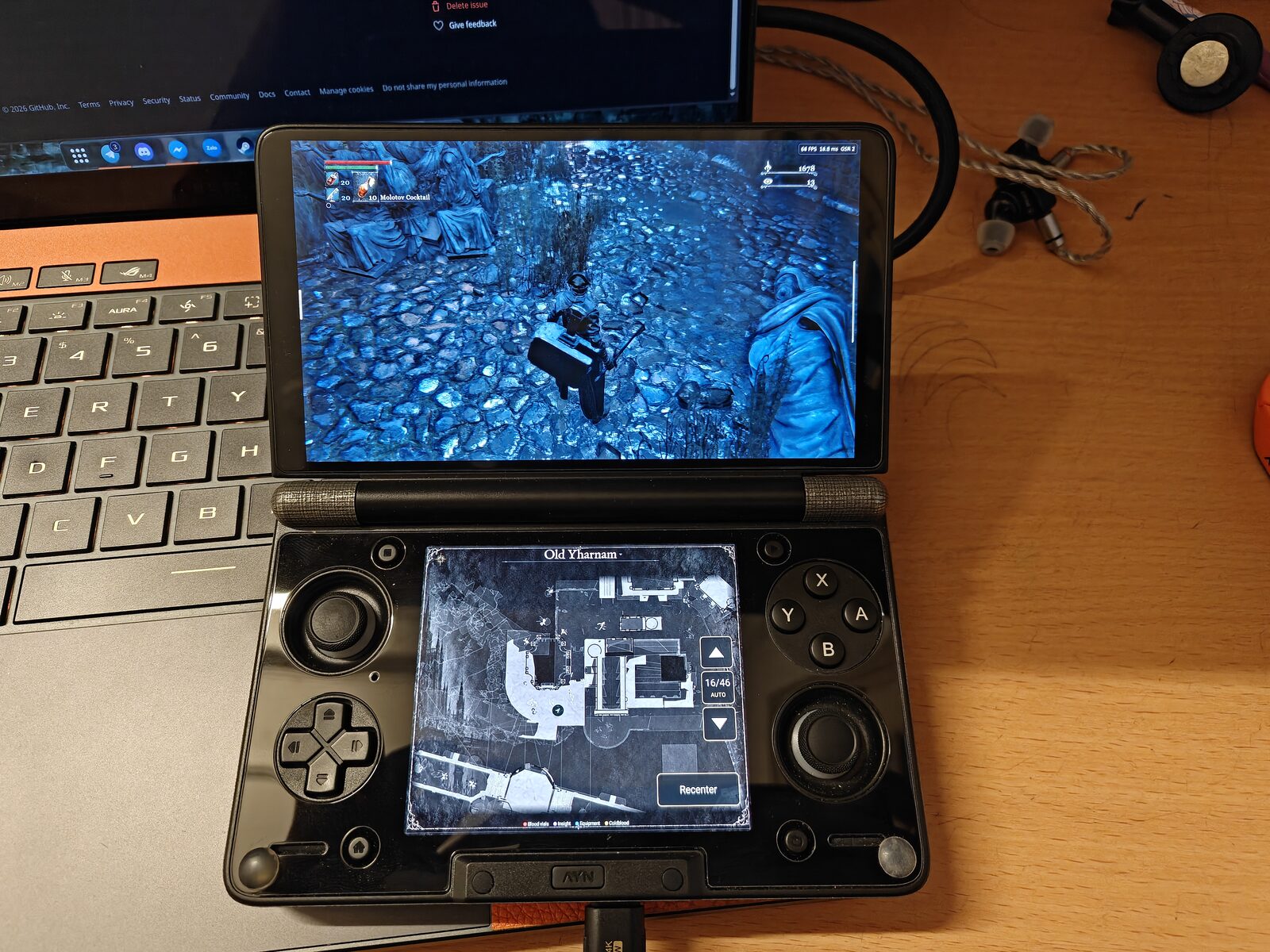
What the AYN Thor video shows
CD's Retro Corner published a nine-minute look at Bloodborne running as a dual-screen Android recomp on the AYN Thor on November 14, 2026. The unit in the video is the 16 GB MAX model; the creator says similar hardware should behave comparably. The video covers gameplay impressions, installation and troubleshooting, graphics settings and an FPS test.
It is the same project Recompedia tracks on the Bloodborne Android page: ducvd89's Bloodborne-Android, a static ARM64 recompilation of the PlayStation 4 release, not an emulator. You still need your own Bloodborne 1.09 files, and the app still has to build the game's native library from them. One timing detail matters if you follow along: the video went up on November 14 and release 2.3.0 was tagged on November 15, so check that you are on the current APK rather than the build in the recording.
Bloodborne Dual Screen Android Recomp on the Ayn Thor (YouTube)
Dual screen means the map, not a second view of the game
On the Thor, the second screen runs Hunter's Atlas: a live map that shows your position, floors, lamps, pickups and NPCs while the game stays on the main screen. The same map can go to an external display, and on a single-screen phone it becomes a floating mini map over the game. It is not a second player view and not a DS-style dual render of the game.
The map is more than a static image. Tapping a lamp, item, NPC or any spot draws a route as footprints, including ladders, lifts, drops, levers and doors; holding the mini map for two seconds opens the full map. The map data is about 34 MB and downloads the first time you enable the feature, then updates itself. It is based on MikeTat1988's Hunter's Atlas and is GPL-2.0.
The project does not publish a frame-time cost for keeping the second screen active, so the honest expectation is that the map is cheap next to the game renderer but unmeasured in public notes.
What you need before the second screen does anything
The APK comes from the project's GitHub releases; the video's route is RecompA, an open-source Android launcher that links to authors' releases and keeps the port updated. Neither route includes game data. You need a Bloodborne PlayStation 4 copy at version 1.09 — the base PKG plus the 1.09 update, or an extracted folder with eboot.bin, sce_module and sce_sys. CUSA03173 is the tested release; use the original eboot.bin, because pre-patched 60 FPS files crash in the gestures menu.
The part people underestimate is the native-code build. The app translates the game's x86-64 program to ARM64 once and saves it as libbbaot.so; without a matching file the game does not start. On an AYN Thor with a Snapdragon 8 Gen 2 the build takes about six minutes with the charger connected, needs roughly 4 GB of free RAM and 1 GB of storage, pushes the CPU to about 95 °C, and leaves a file of about 130 MB. A Windows, Linux or Apple Silicon PC can build the same library with the free Rebuild Tool. The result is derived from the game's code and cannot be shared.
Devices: Android 9 or newer, arm64, Snapdragon with Adreno 6xx, 7xx or 8xx. The README lists only the AYN Thor (8 Gen 2, Adreno 740) and the Oppo Find N5 (8 Elite, Adreno 830) as tested, both with 16 GB of RAM. Mali GPUs are not supported; the bundled Mali driver is for testing only.
The settings the Thor is tuned around
The defaults are set for the Thor: GSR 2 Performance upscaling at 1080p output from a 960×540 scene, costly effects off, the lowest model detail and a 60 FPS limit. The project's notes are explicit that model detail matters more than resolution on this chip because the GPU spends most of its time on geometry. If the device has less than 12 GB of RAM, stay at 1080p output or below; above that memory use rises sharply.
Two settings change how the port feels. Keep game speed when FPS drops holds the game at real speed down to 20 FPS instead of slipping into slow motion, and should be turned off if physics misbehave. Bloodframe, the port's frame generation, runs 2× on the Thor at about 34 real plus 34 generated frames per second for roughly 4 ms of GPU time; the recommended preset is 2×, performance mode and FP16, and it works best above 30 FPS. Release 2.3.0 added the MAKO-FG model, which needs no Lossless.dll.
The video gives one setting its own chapter at 3:40 and calls it the most important of all. The project's public tuning notes single out model detail and keep-game-speed as the two that most change the Thor experience; watch that chapter for the creator's pick on the build he used.
How to read the FPS chapter
The FPS test at 6:30 is a short gameplay check on one 16 GB Thor running one build. It is useful as a sanity check for what the port looks like in motion; it is not a benchmark across phones, drivers or game areas. The README's only hard number for frame generation is the 34 + 34 result above.
The same caution applies to the whole port. It is experimental; two devices are listed as tested; Mali is unsupported; 2.3.0 changed the signing key, so it will not install over 2.2.1 or older and needs a clean uninstall with saves backed up first. A release tag is evidence of activity, not an independent test of your phone.
Who should try dual-screen Bloodborne now
Dual-screen Bloodborne makes sense if you already own Bloodborne 1.09, have a Thor or another 16 GB Adreno device, and want the map without pausing or switching apps. The second screen is a convenience, not a new way to play; the game is the same beta recomp.
On a single-screen phone the floating mini map gives most of the same information. The setup cost is the same either way: your own game, a native-code build, and a device inside the supported range. The full step-by-step is on the Bloodborne Android page; the wider list of Android ports is on the Android platform page, and the recompiled games list is the place to start if you are choosing a project.
Bloodborne Android: setup, requirements and known issues
Recompedia does not host or link to ROMs, BIOS files or game assets. Every project listed requires a copy of the original game owned by the player.